Fluid Levels Uncertainty
If the fluid compartment contains both oil and gas and has a gas-oil contact (GOC) and free water level (FWL), you can model them simultaneously as uncertainty parameters in the volumetric studies. With JewelSuite, you can select from four different modeling methods on the Uncertain Fluid Levels dialog. Click on the uncertainty symbol  next to the GOC or FWL column on the Fluid Levels form (Model > Fluids > Fluid Modeling Workflow > Fluid Levels) to open this dialog. Depending on the fluid leg information available for the fluid compartment, along with the range of uncertainty of the fluid levels, select an appropriate method from the drop-down list below GOC Uncertainty Method. Hover over the adjacent tooltip
  to view a brief description of the selected method.
The four methods to define uncertain fluid levels are summarized in the following table.
|
GOC Uncertainty Method |
Description |
Method schematic |
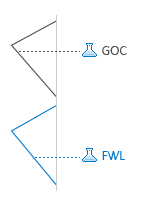
| GOC - No overlap | GOC and FWL uncertainties are defined independently. There is no overlap between the fluid levels; FWL is always sampled deeper than GOC. |
|
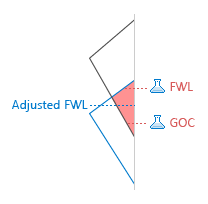
| GOC - Weighted average | GOC and FWL uncertainties are defined independently. This method is for overlapping fluid levels. For realizations when FWL is sampled shallower than GOC, both fluid levels are adjusted to the weighted average of sampled GOC and FWL; The adjustment results in no oil rim. |
|
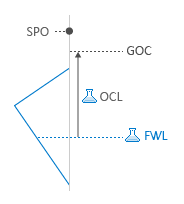
| Oil column length | GOC uncertainty is dependent on the FWL and the oil column length (OCL) uncertainties. Calculated GOC = Sampled FWL - Sampled OCL If the calculated GOC is above the ‘Shallowest possible oil depth’ (SPO), calculated GOC is adjusted to SPO. |
|
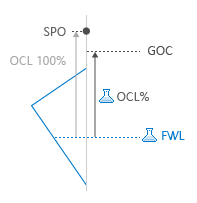
| Oil column % | GOC uncertainty is dependent on the FWL and Oil Column % (OCL%) uncertainties. GOC = Sampled FWL - (OCL 100% * Sampled OCL%); OCL 100% = Sampled FWL - Shallowest possible oil depth (SPO); If the length of of ‘OCL 100%’ exceed the defined ‘Max oil column length’ (Max OCL). it is adjusted to Max OCL. OCL 100% = Min [(Sampled FWL-SPO), Max OCL] |
|
Depending on the selected GOC uncertainty method, the input entries and criteria for each method is different. The details for each method and their entry labels are described below.
 GOC - No overlap
You can use this method for modeling fluid level uncertainties if the range of uncertainty for gas-oil contact (GOC) and free water level (FWL) do not overlap each other. The definition of fluid levels is not dependent on each other and the values for FWL are always sampled deeper than the GOC. Also, either one or both fluid levels can be uncertain and defined accordingly.
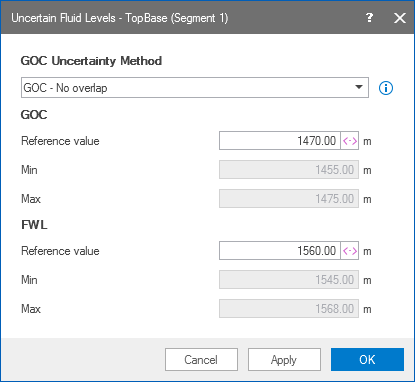
Uncertain fluid levels form using the 'GOC - No overlap' method click to enlarge
Using the GOC - No overlap method
- Enter the Reference value for GOC and FWL on this dialog or on the Fluid Levels form.
- Use the uncertainty symbol to open the Uncertainty parameter dialog and provide the statistical distribution of uncertain fluid levels.
- The Min and Max values for both fluid levels are listed on uncertain fluid levels dialog and must not overlap each other. Click Apply to save changes and keep working on this dialog, or click OK to go back to the Fluid Levels form.
In this method, the fluid levels are defined independently and it is relevant for fluid levels with an overlapping values of uncertainty ranges. If the realization samples the FWL shallower than the GOC, the weighting factor adjusts the sampled values of fluid levels to create a valid realization. In such cases, the adjustment using the weighting factor results in realization without an oil rim. For example, a weighting factor of 1 for FWL results in sampled value of FWL being used in the realization, with gas and water phase only.
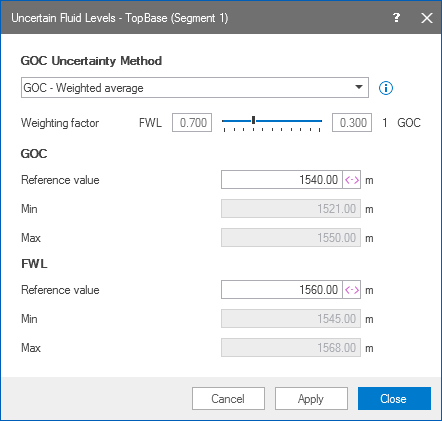
Uncertain fluid levels form using the 'GOC - Weighted average' method click to enlarge
Using the GOC - Weighted average method
- Weighting factor Click on the scale pointer and drag it to adjust the values, or use the mouse scroll wheel.
- Reference value Enter the reference value for fluid levels on this dialog or on the Fluid Levels form.
- Use the uncertainty symbol to open the Uncertainty parameter dialog and provide the statistical distribution of uncertain fluid levels. Note that both fluid levels must be set uncertain for this method.
- The Min and Max values for both the fluid levels, extracted from the uncertainty distribution, are listed on uncertain fluid levels dialog. Click Apply to save changes and keep working on this dialog, or click OK to go back to the Fluid Levels form.
In this method, the uncertainty for GOC is defined in terms of FWL and the oil column length. The FWL and the oil column length are uncertain parameters and the GOC uncertainty is dependent on both the parameters. The resulting GOC is the difference between the sampled FWL and the sampled oil column length, but limited to the shallowest possible oil depth (SPO).
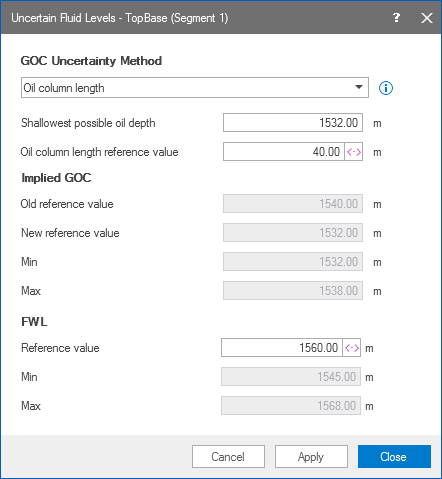
Uncertain fluid levels form using the 'Oil column length' method click to enlarge
Using the Oil column length method
- Shallowest possible oil depth (SPO) Enter the lowest depth value where oil is seen. The calculated GOC cannot be lower than the SPO.
- Oil column length reference value Enter the reference value for the oil column length.
- FWL Reference value for free water level.
- Use the uncertainty symbol to open the Uncertainty parameter dialog and provide the statistical distribution for oil column length and free water level. Important Both FWL and oil column length must be uncertain parameters when using this method.
- Implied GOC (read only) Calculated using the sampled values from oil column length and FWL. Based on the previous inputs, an old reference value is listed along with the new reference value. The Min and Max values are also shown for the implied GOC, extracted from the sampled values of oil column length and FWL.
- Click Apply to save changes and keep working on this dialog, or click OK to go back to the Fluid Levels form.
In this method, the uncertainty of the GOC is dependent on the sampled FWL value, and the oil column length defined in percentage. On the dialog, you must also provide the Maximum oil column length (Max OCL) and the Shallowest possible oil depth (SPO). The FWL and the OCL% are uncertain parameters that must be defined to generate values for the GOC uncertainty range.
For each realization, an ‘Oil Column Length 100%’ (OCL 100%) value is generated. The product of OCL 100% and the sampled OCL% value gives the length of the oil column. So the resulting GOC value is the difference between the sampled FWL and the length of oil column generated in the previous step. Refer to the steps below to understand the calculation of GOC from the sampled FWL and OCL% values.
Calculation method used to generate GOC for each realization
- OCL 100% = Min[(Sampled FWL - SPO), Max OCL]
- Oil column length = OCL 100% * Sampled OCL%
- Calculated GOC = Sampled FWL - Oil column length
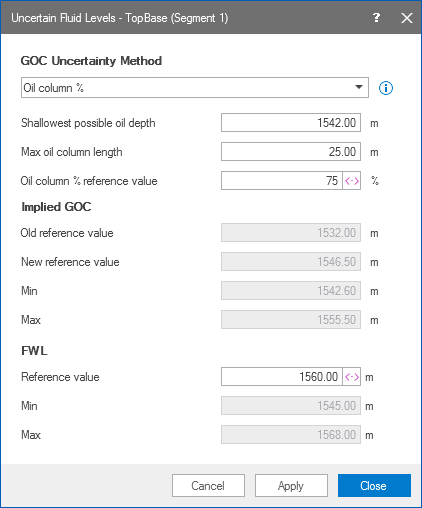
Uncertain fluid levels form using the 'Oil column %' method click to enlarge
Using the Oil column % method
- Shallowest possible oil depth (SPO) Enter the lowest depth value where oil is seen. The calculated GOC cannot be lower than the SPO.
- Max oil column length (Max OCL) Enter the value for the maximum oil column length.
- Oil column % reference value Reference value in percentage that is used to calculate the oil column length. This value can be between 0 to 100%.
- FWL Reference value for free water level.
- Use the uncertainty symbol to open the Uncertainty parameter dialog and provide the statistical distribution for oil column % and free water level. Note that it is obligatory that both FWL and oil column length are uncertain parameters when using this method.
- Implied GOC (read only) Calculated using the sampled values from oil column % and FWL. Based on the previous inputs, an old reference value is listed along with the new reference value. The Min and Max values are also shown for the implied GOC, generated using the sampled values of oil column % and FWL as described above.
- Click Apply to save changes and keep working on this dialog, or click OK to go back to the Fluid Levels form.